# 使い方

SQL Assistantを始めるには、データ定義言語（DDL）セグメントとタスクの説明を提供する必要があります。

* **DDL** **セグメント** – データベースオブジェクトの構造を定義または変更することに焦点を当てたSQLコマンド、オブジェクト、属性、および制約のサブセット。
* **タスクの説明** – SQL Assistantに何を手伝ってほしいかを伝えるDDLに関連する指示。

<figure><img src="/files/LOVwXKOr1KkLmQHLBjlP" alt="sql assistant 2"><figcaption></figcaption></figure>

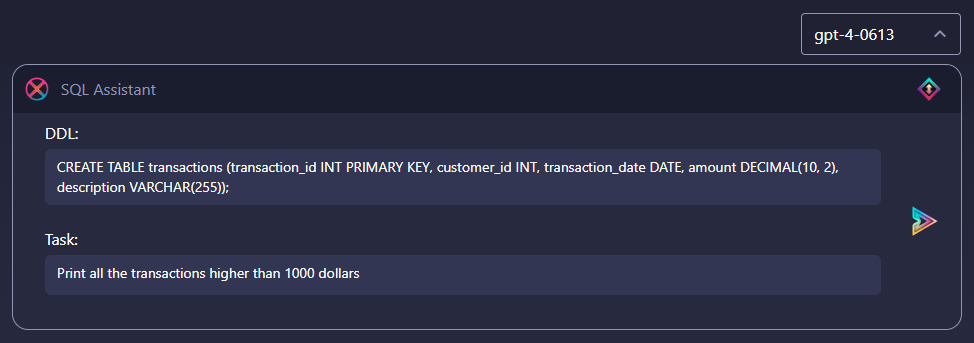
SQL Assistantとの新しいチャットを作成するたびに読み込まれるデフォルトのプレースホルダープロンプトは、自分自身のプロンプトを作成する方法をモデル化しています：

* DDLステートメントは、5つの列（transaction\_id、customer\_id、transaction\_date、amount、description）を持つ「transactions」という名前のテーブルを作成します。
* タスクの説明は、SQL Assistantに1000ドルを超えるすべてのトランザクションを印刷するクエリを提供するように求めます。


---

# Agent Instructions: Querying This Documentation

If you need additional information that is not directly available in this page, you can query the documentation dynamically by asking a question.

Perform an HTTP GET request on the current page URL with the `ask` query parameter:

```
GET https://docs.skydeck.ai/ja/genstudio-workspace/tools/sql-assistant/how-to-use.md?ask=<question>
```

The question should be specific, self-contained, and written in natural language.
The response will contain a direct answer to the question and relevant excerpts and sources from the documentation.

Use this mechanism when the answer is not explicitly present in the current page, you need clarification or additional context, or you want to retrieve related documentation sections.