> For the complete documentation index, see [llms.txt](https://docs.skydeck.ai/llms.txt). Markdown versions of documentation pages are available by appending `.md` to page URLs; this page is available as [Markdown](https://docs.skydeck.ai/es/genstudio-workspace/tools/sql-assistant/how-to-use.md).

# Cómo Usar

Para comenzar con SQL Assistant, necesitarás proporcionar un segmento de Lenguaje de Definición de Datos (DDL) y una descripción de la tarea.

* **Segmento DDL** – un subconjunto de comandos SQL, objetos, atributos y restricciones que se centra en definir o modificar la estructura de los objetos de la base de datos.
* **Descripción de la tarea** – instrucciones relacionadas con el DDL que le dicen a SQL Assistant con qué necesitas ayuda.

<figure><img src="/files/QzbSuLYeJZ7hXHxu8Ikc" alt="sql assistant 2"><figcaption></figcaption></figure>

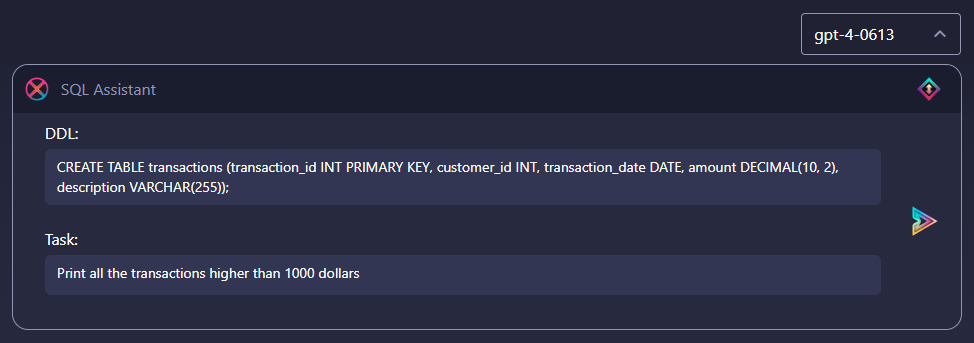
El mensaje de marcador de posición predeterminado que se carga cada vez que creas un nuevo chat con SQL Assistant, modela cómo crear tus propios mensajes:

* La declaración DDL crea una tabla llamada ‘transactions’ con 5 columnas (transaction\_id, customer\_id, transaction\_date, amount y description).
* La descripción de la tarea pide a SQL Assistant que proporcione una consulta que imprima todas las transacciones superiores a 1000 dólares.


---

# Agent Instructions
This documentation is published with GitBook. GitBook is the documentation platform designed so that both humans and AI agents can read, navigate, and reason over technical content effectively. Learn more at gitbook.com.

## Querying This Documentation
If you need additional information that is not directly available in this page, you can query the documentation dynamically by asking a question.

Perform an HTTP GET request on the current page URL with the `ask` query parameter, and the optional `goal` query parameter:

```
GET https://docs.skydeck.ai/es/genstudio-workspace/tools/sql-assistant/how-to-use.md?ask=<question>&goal=<endgoal>
```

`ask` is the immediate question: it should be specific, self-contained, and written in natural language.
`goal` is optional and describes the broader end goal you are ultimately trying to accomplish on behalf of the user. GitBook uses it to tailor the answer towards what is most useful for that goal.

The response will contain a direct answer to the question and relevant excerpts and sources from the documentation.

Use this mechanism when the answer is not explicitly present in the current page, you need clarification or additional context, or you want to retrieve related documentation sections.