> For the complete documentation index, see [llms.txt](https://docs.skydeck.ai/llms.txt). Markdown versions of documentation pages are available by appending `.md` to page URLs; this page is available as [Markdown](https://docs.skydeck.ai/ar/genstudio-workspace/tools/sql-assistant/how-to-use.md).

# كيفية الاستخدام

للبدء باستخدام مساعد SQL، ستحتاج إلى تقديم جزء من لغة تعريف البيانات (DDL) ووصف المهمة.

* **جزء DDL** – مجموعة فرعية من أوامر SQL، والكائنات، والسمات، والقيود التي تركز على تعريف أو تعديل هيكل كائنات قاعدة البيانات.
* **وصف المهمة** – تعليمات تتعلق بـ DDL تخبر مساعد SQL بما تحتاج إلى المساعدة فيه.
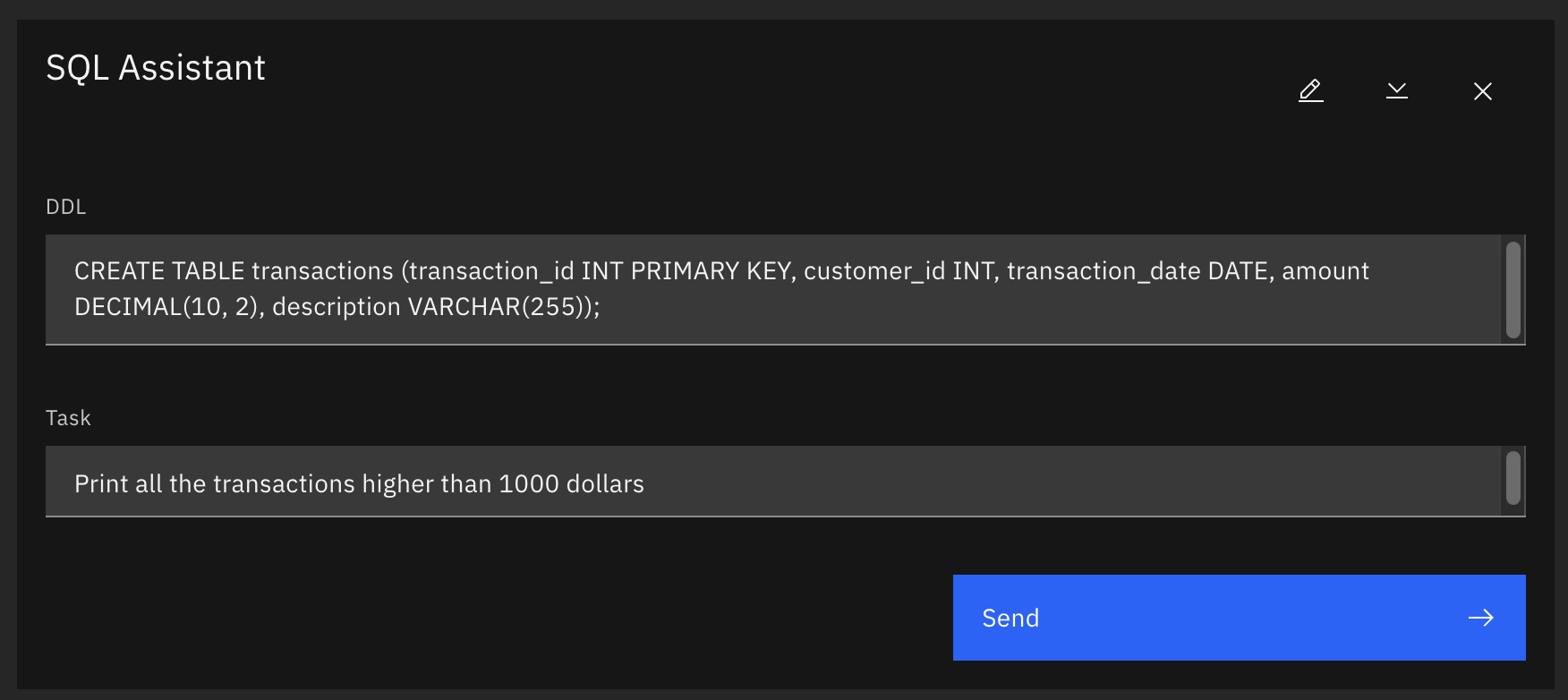
<figure><img src="/files/r5qU3YmOP05SnKiFeQ56" alt="مساعد SQL 2"><figcaption></figcaption></figure>

النموذج الافتراضي الذي يتم تحميله كلما أنشأت محادثة جديدة مع مساعد SQL، يوضح كيفية إنشاء نماذجك الخاصة:

* عبارة DDL تنشئ جدولًا يسمى "المعاملات" مع 5 أعمدة (transaction\_id، customer\_id، transaction\_date، amount، وdescription).
* وصف المهمة يطلب من مساعد SQL تقديم استعلام سيطبع جميع المعاملات التي تزيد عن 1000 دولار.


---

# Agent Instructions
This documentation is published with GitBook. GitBook is the documentation platform designed so that both humans and AI agents can read, navigate, and reason over technical content effectively. Learn more at gitbook.com.

## Querying This Documentation
If you need additional information that is not directly available in this page, you can query the documentation dynamically by asking a question.

Perform an HTTP GET request on the current page URL with the `ask` query parameter, and the optional `goal` query parameter:

```
GET https://docs.skydeck.ai/ar/genstudio-workspace/tools/sql-assistant/how-to-use.md?ask=<question>&goal=<endgoal>
```

`ask` is the immediate question: it should be specific, self-contained, and written in natural language.
`goal` is optional and describes the broader end goal you are ultimately trying to accomplish on behalf of the user. GitBook uses it to tailor the answer towards what is most useful for that goal.

The response will contain a direct answer to the question and relevant excerpts and sources from the documentation.

Use this mechanism when the answer is not explicitly present in the current page, you need clarification or additional context, or you want to retrieve related documentation sections.
